
Academics are at the heart of your Cornell experience.
Review these pages for information about
Selecting a Course
Unless otherwise stated, all SCE classes are regular, credit-bearing Cornell classes.
Before selecting your course, be sure you meet any prerequisites listed. Also, if you wish to take more than one course in a session, check the credit limits (see below). Learn about the grading basis options (see below) for each class.
All class times listed are in Eastern Time.
Selecting online courses
Online courses are offered synchronously and/or asynchronously. To determine which method will be utilized, find your course on the roster and look for “instruction mode.”
Definitions of online instruction modes
- OL/Online Learning (async+sync)
This course will be delivered completely online. Required class components (such as lectures, labs, discussions, etc.) may be delivered in pre-recorded (asynchronous) and/or live (synchronous) modes. For example, an instructor may provide pre-recorded lecture materials that you view on your own schedule but require that you attend live discussions at scheduled times. You are expected to participate in live, prescheduled (synchronous) sessions. - AD/Online — Asynchronous (async)
This online course features well-designed, pre-recorded (asynchronous) content that you may access at any time, on your own schedule, however the class will have periodic assignment and/or exam deadlines which must be met. You will interact with other students and the instructor via the Canvas online learning system, which may include email, online discussion boards, interactive chat rooms, and/or video conferences. Many instructors also offer online office hours. - SD/Online — Synchronous (sync)
This online course features well-designed content, live interactions (synchronous), and required class components (such as lectures, labs, discussions, etc.) that you access at pre-scheduled times. For example, during a six-week summer class, your instructor might deliver lectures from 10:00–11:00 a.m. on Mondays–Fridays and hold discussions on Tuesdays and Thursdays from 1:00-2:15 p.m. These sessions will be delivered live via videoconferencing software (e.g., Zoom). You are expected to participate in live, prescheduled (synchronous) sessions.
View online course rosters by term
Selecting on-campus courses
For summer in-person courses, view the summer 2026 roster. You can filter this list by subject, session, eligibility, and more.
Fall/Spring non-degree study students, view the
- Fall 2026 on-campus course roster
- Spring 2026 on-campus course roster
Course information for registration forms
You’ll need to enter the following information on your registration request form:
- Class name
- Credits
- Grading basis
- Class number
- Component number
Annotated roster examples:
| A course roster example showing class name, prerequisites, credits, grading basis, and course status. View roster example #1 full-sized | 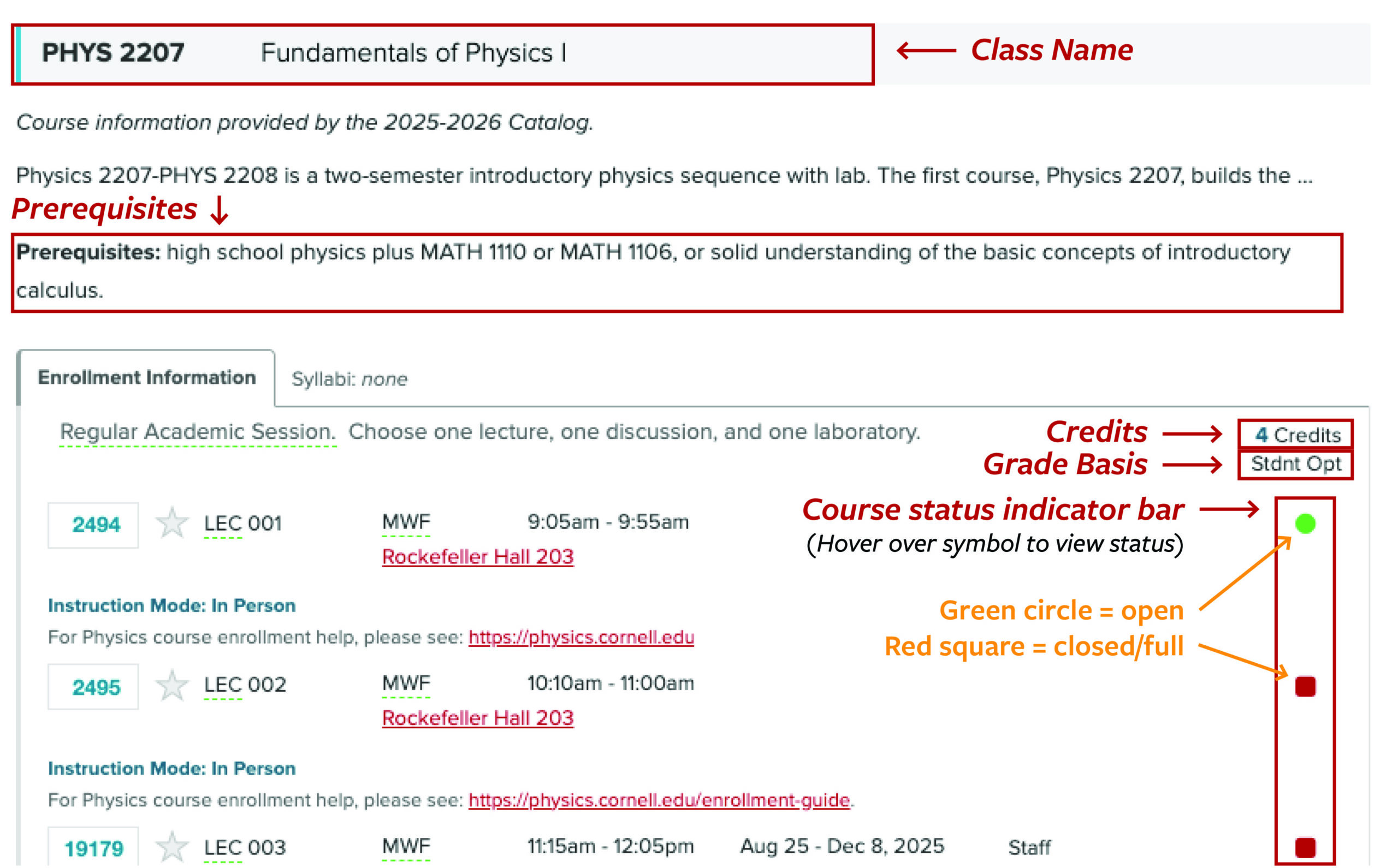 |
| A course roster example showing class numbers, component types, and component numbers. View roster example #2 full-sized. | 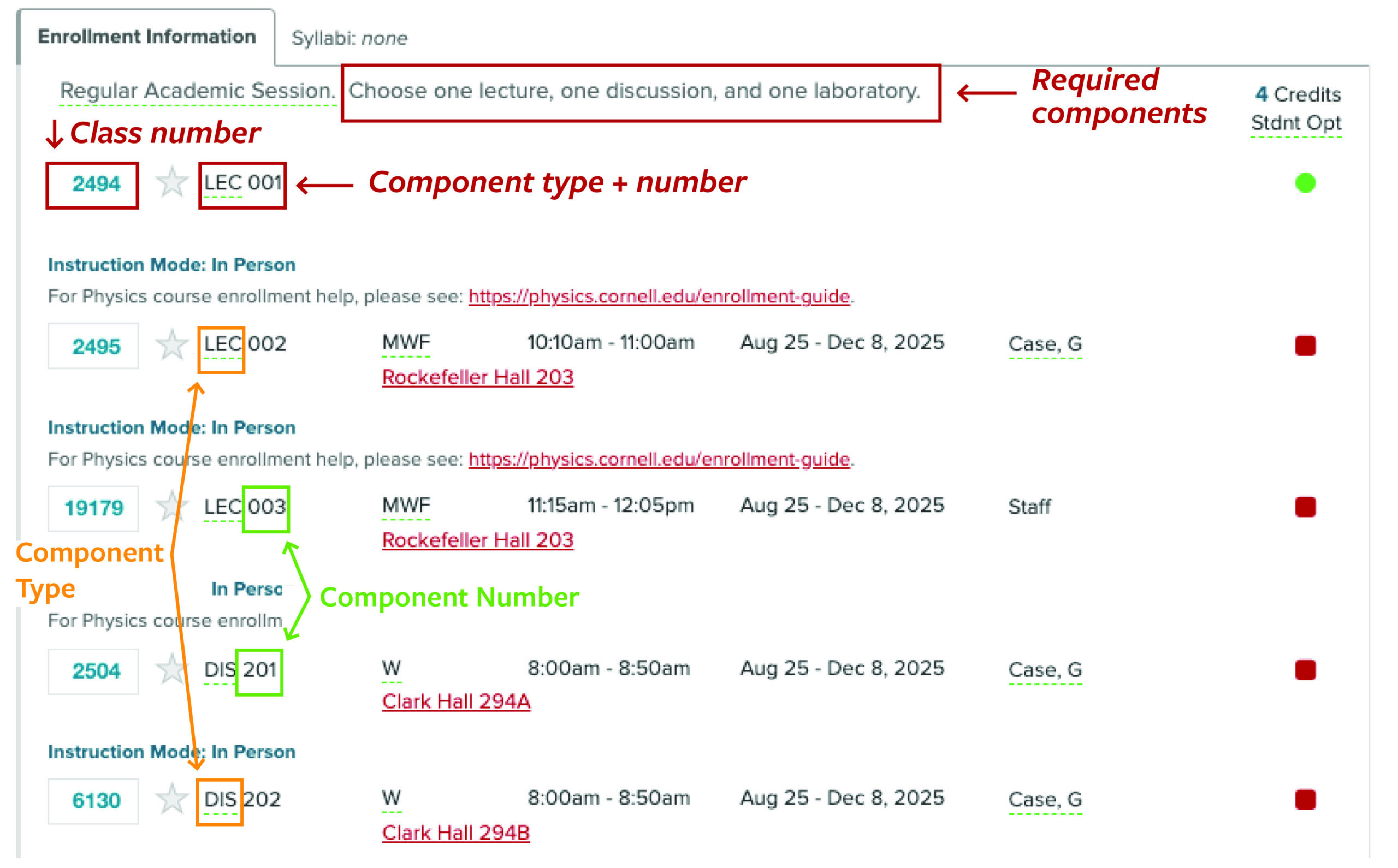 |
Time in class
For each hour of lecture, you should plan on two to three hours of homework.
If you are taking a summer or winter course, this timing reflects the fact that you’ll be completing an entire college semester in just a few weeks.
For example, if you take one three-credit, six-week class, you should plan to spend approximately 1.5 hours in class and up to three hours doing homework each day. If you take two three-credit, six-week classes, you should plan to spend approximately three hours in class and up to six hours doing homework each day.
We strongly encourage you not to miss a single class due to the large amount of material covered in each session. Missing any class time can put you in serious academic jeopardy.
Course Materials & Expectations
Canvas
Shortly before the start of your course, your instructor will post important class information on Canvas.
This information generally includes your course syllabus (which usually lists your required textbooks and materials) as well as assignments, quizzes and exams, homework, discussions, grades, announcements, and office hours.
To learn more about Canvas, visit Canvas Student Resources.
Purchasing course textbooks & materials
Please begin by reviewing your course syllabus to determine if textbooks or other course materials are required. You can find your course syllabus on your course Canvas site, which is generally published a few days before the start of classes.
If your course requires an eTextbook, please note the textbook name, author’s name, ISBN (if provided), publisher, and edition. Then visit The Cornell Store to purchase your eTextbooks.
You’ll have several purchase/rental options (e.g., 180 days, one year, lifetime).
Communicating with your instructor
To contact your instructor, click on the link for your course and locate the “Instructor” field.
Note the instructor’s NetID (such as “ewe1”) and send an email to this NetID followed by “@cornell.edu.” For instance, in this example, your email would go to “ewe1@cornell.edu”.
If an instructor is not listed, contact us at cusce@cornell.edu or (607) 255-4987.
Instructor email information can also be located by searching for their name or NetID in the Cornell Directory.
When sending email messages to your instructor, please use your Cornell NetID email.
Course expectations
Below are general class expectations. Your instructor may also share additional expectations on the syllabus.
- Attend class daily, including all required lectures, discussions, break-out sessions, labs, etc.
- Be prepared to actively participate in discussions and activities.
- Keep up with required reading.
- Regularly check the course website on Canvas (if used) for class announcements and assignments.
- Complete all assignments and exams in a timely manner.
- Abide by Cornell policies including the Code of Academic Integrity.
Course Changes & Withdrawals
Course changes include
- Adding or dropping a course
- Changing the number of credits
- Changing from credit to auditor status or vice versa
- Changing the grade option
Make a course change
Before the course change deadline
Non-degree students: Please make course changes via your Non-degree Study student registration portal.
Current Cornell students and those in the Employee Degree Program: Please make course changes in your Student Center prior to the add/drop deadlines.
After the course change deadline
After the add/drop/change deadlines have passed, you must submit a petition form for requested changes. Visit the Petitions and Appeals page for instructions.
Additional instructions for Cornell employees not in the Employee Degree Program
If you wish to drop a class, you’re required to submit course change approvals from both your direct supervisor and department head. Please collect these approvals and email them, with your course change request (include course name and number) to the School of Continuing Education at cusce@cornell.edu.
Questions?
For questions about which forms to use, contact your College Registrar’s Office.
Course change deadlines
You must make course changes before the course change deadline for your session. See the Summer Session, Winter Session, or Fall/Spring Study calendar for more information.
As noted above, a petition form is required for all course changes requested after the course change deadline. Visit the Petitions and Appeals page for instructions.
Note:
- If you stop attending class without officially dropping the class, you are liable for all tuition and fees, and you will receive a grade of F.
- If you drop a class after the drop deadline, a mark of “W” will appear on your transcript in place of a grade for that class.
- If you want to withdraw from an off-campus program, consult the program director.
See also refunds and withdrawals.
Credit, Grades & Transcripts
Credits
Before submitting your registration materials, consult the appropriate official in your school, college, or university to make sure that the credit you earn from your courses will count toward your degree.
Cornell grants academic credit in semester units. To convert them to quarter units, multiply by 1.5.
Credit limits
Summer Session
- Up to four credits in a three-week period (effectively a 20-credit semester)
- Up to eight credits in a six-week period (a 20-credit semester)
- Up to ten credits in an eight-week period (a 19-credit semester equivalent)
- Up to fifteen credits during the entire summer period (May-August)
Winter Session
- One class or up to four credits
Fall/Spring Study
- Domestic students: Up to eleven credits per semester, unless you receive special permission to exceed that limit (see below)
- International students: Up to fifteen credits per semester
May I exceed these credit limits?
Credit limits may be exceeded only in the most extraordinary of circumstances. In addition, requests to take more than fifteen credits will not be approved.
To request permission to exceed credit limits, you must submit a petition that addresses your specific reasons for wanting to do this.
You must also complete the appropriate registration process.
If you’re a Cornell undergraduate
Your request must include the endorsement of your academic advisor
If you’re a visiting Fall/Spring study student
Your request must include
- A detailed explanation of your rationale for exceeding the credit limit
- Your plan for ensuring you’ll successfully complete all of your coursework
- A written acknowledgement that you have reviewed the health-related requirements and fees for visiting students enrolled in twelve or more credits on-campus in the Fall/Spring semester
Grades & symbols
Grading basis
The grading basis for a class may be
- Letter (A+ to F)
- Satisfactory/Unsatisfactory (S/U)
- Student option (in which case you may select either “Letter” or “Satisfactory/Unsatisfactory” as the grading basis)
You may change the grading basis for “student option” classes by submitting an electronic add/drop/change request form prior to the deadline or, for currently matriculated students, by making the change in Student Center.
Once the deadline has passed, all requests for grading basis changes must be done via petition.
Final grades
You can get your final grade(s) at the end of the semester by logging on to Student Center and clicking on “Grades” under Academic History. Your Cornell NetID and password are required.
Note:
- Grades cannot be given over the telephone, email, or fax.
- If you’re unable to access your grade(s), contact the IT Service Desk.
- If you withdraw from a course on or after the withdrawal deadline, the symbol “W” appears on your transcript for the dropped course.
- When you register as an auditor, the symbol “V” appears on your transcript.
Note: Cornell undergraduates are not permitted to audit courses.
For more information, visit the University Catalog website.
Transcripts
Your enrollment in courses, your grades, and the number of credits you earn will be recorded on an official Cornell University transcript and will be a part of your permanent and complete academic record at the university.
To request a transcript, visit Ordering Transcripts on the Office of the University Registrar website. Your Cornell NetID and password are required.
If you do not have a NetID or your attendance began before 1982, use the Self-registration ordering site.
For more information, visit the Office of the University Registrar website.
Final Exams
Where will exams be held?
Exams for in-person, on-campus courses will be held in your course classroom unless changed by your instructor.
When will exams be held?
Exam schedules
- Summer Session exam dates: See the Summer Session academic calendar for exam periods. For class-specific exam dates, search the course roster for your class or contact your instructor.
Note to instructors: Per university policy, in the event students have more than two exams in 24 hours, you are urged to grant requests for a make-up examination. In addition, you must provide accommodations to students who may not have reliable access to an online exam or who are in different time zones. Faculty who need to make accommodations for students or intend to move their exam should communicate with their students in advance to determine the number of conflicts that may be created.
- Winter Session exam date: January 16 or 17, 2026. Final exams will be held on the last day of class (1/16), at a time to be arranged by the instructor and announced the first week of classes. Due to a limited number of class days in Winter Session 2026, exams may be held on Saturday, January 17 if approved, by SCE, prior to start of classes.
- Fall/Spring exam dates
If you are unsure about when your final exam will be held, please contact your instructor or the School of Continuing Education.
When are final projects due?
If a course requires an end-of-class exercise (for example, a paper, project report, final critique, oral presentation, or conference) in lieu of or in addition to a final examination, the nature of the exercise must be made known at the beginning of the semester. If there is no final examination in a course, an announcement must be made to that effect.
A course that requires an end-of-class exercise and does not offer a final examination must allow students at least until the date appearing on the official examination schedule to complete submission of materials associated with the culminating exercise. (For example, a student making a presentation during the last week of classes or during study period will have at least until the scheduled final-exam date to submit a final write-up or equivalent.)
ID Cards
Identification cards
Visiting students
If you’re a visiting student (i.e., not a degree-seeking, matriculated Cornell student) and are enrolled in an on-campus class through the School of Continuing Education, you’ll need to obtain a Cornell Student ID card. For instructions, see the Onboarding page.
Cornell staff
If you’re a regular, non-academic Cornell employee, or non-professorial academic staff, you may use your Cornell ID card.
There is a $40 charge to replace a lost ID.
NetID activation
You’ll need a Cornell Network ID (NetID) to access important Cornell services including email, your grades, bursar bills, library services, official university announcements, and more. Your Cornell email account will be used for official university announcements.
Instructions:
- When completing your registration request form, answering “yes” to the question “May we send occasional text messages to your cell phone?” will allow IT to send text messages for NetID activation, which expedites the process.
- Follow the steps on the Onboarding page to activate your NetID.
You’re expected to activate your NetID and Cornell email account immediately upon receipt.
Information Technology
Information technology services at Cornell are offered through IT@Cornell.
Find answers to all your questions about Cornell’s IT services, including free tools to help you collaborate and stay organized. Start the semester strong by reviewing privacy safeguards and tips to avoid phishing scams, learn how to protect your NetID and password, computer and mobile devices, and stay safe online.
Need IT help? Contact the IT Service Desk.
Cornell NetIDs
To access many of the university’s IT resources, you’ll need your active Cornell NetID and password.
Your NetID is a unique identifier that provides access to your Cornell email and other non-public Cornell resources and information. To protect your personal information and Cornell data, never share your NetID password with someone else.
If you have any questions about NetIDs or need help activating your NetID or setting up your Cornell email address, please contact the IT Service Desk.
With your NetID, you can
- Access the Student Center to check your class schedule, see your grades, access your Bursar account, order your transcript, and update your addresses and emergency contacts.
- Access Cornell Library services and Canvas, Cornell’s course management system.
- Sign in to Cornell Google Workspace for Students, Cornell’s email, calendar, and collaboration service for students. Your Cornell email account will be used for official university announcements.
- Complete online evaluations, and more.
How do I get a NetID?
See ID cards (above) for instructions.
Computer labs
Students have access to computer labs on campus.
Most labs function on a first-come, first-served basis, while others offer reservations.
Some campus libraries offer public computers, and Olin Library and Mann Library offer laptop and equipment loans.
How can I print on campus?
CU Print is a fee-based service that lets you print to laser printers and plotters located in Cornell’s computer labs, libraries, and elsewhere around campus, using a lab computer or personal computer connected to the Cornell network.
To use CU Print, you must first create an account, to which you can add money with a credit or debit card. CU Print deposits are nonrefundable.